Diamond Computers Remote Support
We now offer this service on a yearly subscription. A flat $75.00 fee buys you a seat for one workstation for remote support for a year. So what this does for you is allow you to contact Diamond Computers support staff (Phone Email or Text) and let them know you need something checked or updated or if you believe you have spyware or malware that has gotten into your machine. If this service is quick and requires little time on our part than no bill is incurred. If the service is more involved you would be billed accordingly but you would be notified first of this instance. This service is offered from Diamond Computers to possibly eliminate the need for the machine to be brought into Diamond Computers. Not all issues can be solved remotely, but a host of problems can be addressed remotely. Diamond Computers schedules these as time permits on both our end as well as yours and the availability of such by both parties. This is a safe and secure means of offering service to our clients, both home and business clients. One stipulation is that the machine needing this support is able to connect to the internet. If no internet connectivity is available than this service will not work.
Rates: There is a flat rate of $75.00 per seat on workstations and $125.00 on a Servers per year. This will be billed at time of service when service begins. If extended time is necessary to resolve and issue it will be billed at $85.00 per hour on both Workstations and Servers.
Schedule Your Remote Service Call Here
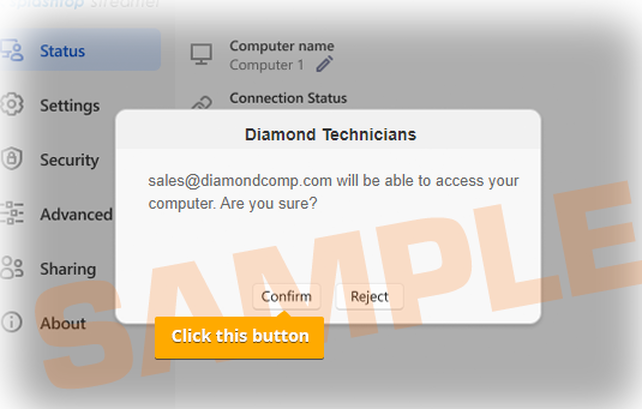
When remote service is scheduled you will (while on phone with technician) use this link to obtain and install remote support application. Wait for this install until on phone with Diamond Support Staff. Or if you prefer you can install on your own but take note of message and screen shot below.
IMPORTANT!! DO NOT CLICK "FINISH" BUTTON ON INSTALLER BEFORE YOU SEE AND HIT CONFIRM ON THE FOLLOWING SCREEN (POPUP)
IMPORTANT!! DO NOT CLICK "FINISH" BUTTON ON INSTALLER BEFORE YOU SEE AND HIT CONFIRM ON THE FOLLOWING SCREEN (POPUP)